Oxygen XML Editor

xml editor

RSS  
About
Downloads
Register
Shop
Resources
Support
Supported platforms

eXist Support

Introduction

This tutorial shows you, step by step, how to configure the eXist support in <oXygen/> XML Editor, browse and edit resources, as well as running XQuery interrogations.

The tutorial assumes that you have a basic knowledge of databases, XML technologies and of <oXygen/> XML Editor tool. The explanations and screen shots are given for the standalone version of the <oXygen/> XML Editor. However the same set of features are available in Eclipse plugin version of the product with minor interface differences.

How to Configure the eXist Support in <oXygen/>

There are two notions you need to understand in order to configure the eXist support in <oXygen/>: the data source and the connection.

1. A data source defines all that is needed in order to have a connection to the database.

Go to <oXygen/>'s Preferences->Data Sources and press the New button in order to add a new data source. Insert a data source name (make sure that each data source has an unique name) and select the eXist type from driver type combo box.

eXist Data Source Configuration Dialog

You also need to add the following eXist specific driver file:

  • exist.jar
  • xmldb.jar
  • xmlrpc-1.2-patched.jar

These files are found in your eXist installation directory.

More information about configuring a eXist datasource can be found in the user manual: http://www.oxygenxml.com/doc/ug-oxygen/native-xml-database-support.html

2. Once you have created the data source you may proceed further by defining one or more connection based on it. The connections can be configured on the same Preferences->Data Source page.

eXist Connection Configuration Dialog

Start by choosing a unique connection name and set the Data Source combo box to the already configured eXist data source. To access eXist from <oXygen/> uses the XML:DB API. The XML:DB API uses a specific URI scheme to locate a collection of XML resources on the server. This URI identifies the database implementation, the name of the connection and the location of the eXist server on the network. Enter this URI in the XML DB URI field. In the Collection field you can specify the default collection that will be used for the xquery collection() function. If you have correctly specified the previous fields you can choose the default collection by using the Select button. Pressing the Select button displays the existing collections on the server.

Sometimes you need to work with two database servers (for example a development sever and a production server) so it makes sense to define a connection on each database server to be further used when executing XQuery or browsing/editing the database resources. If the two database servers have the same version you only need to configure a data source and add two connections for it.

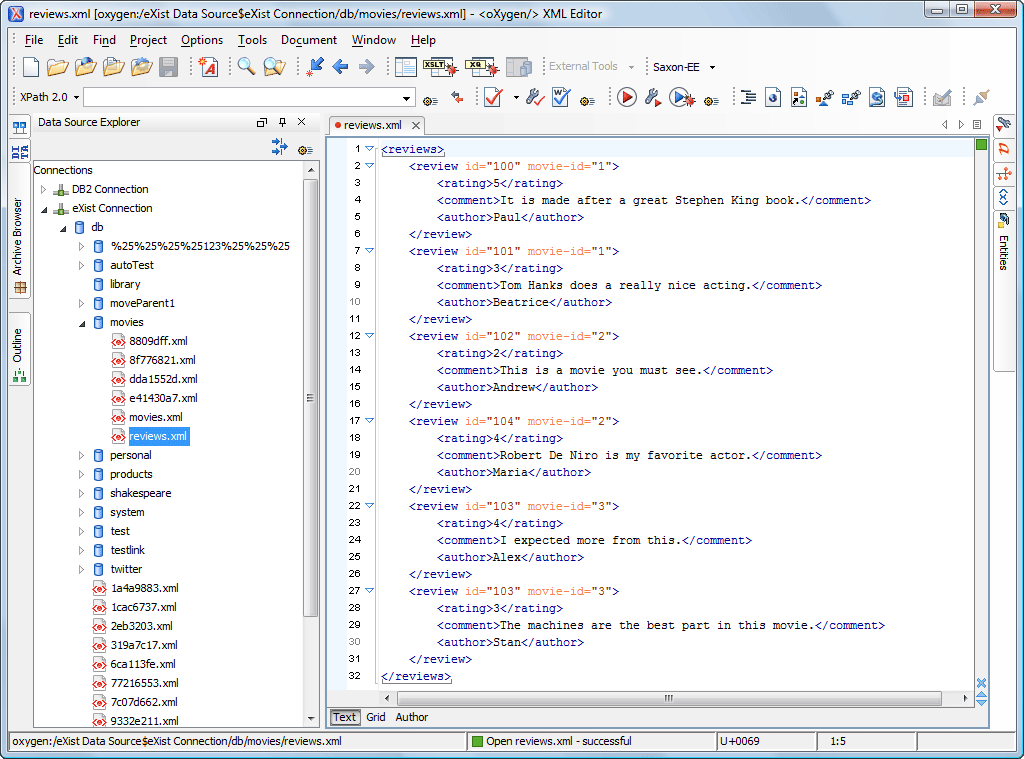
Database Explorer View

Once we finished the configuration of the connection we are able to browse the database content using the Database Explorer view from the Database perspective.

Database Perspective

XQuery Execution Support

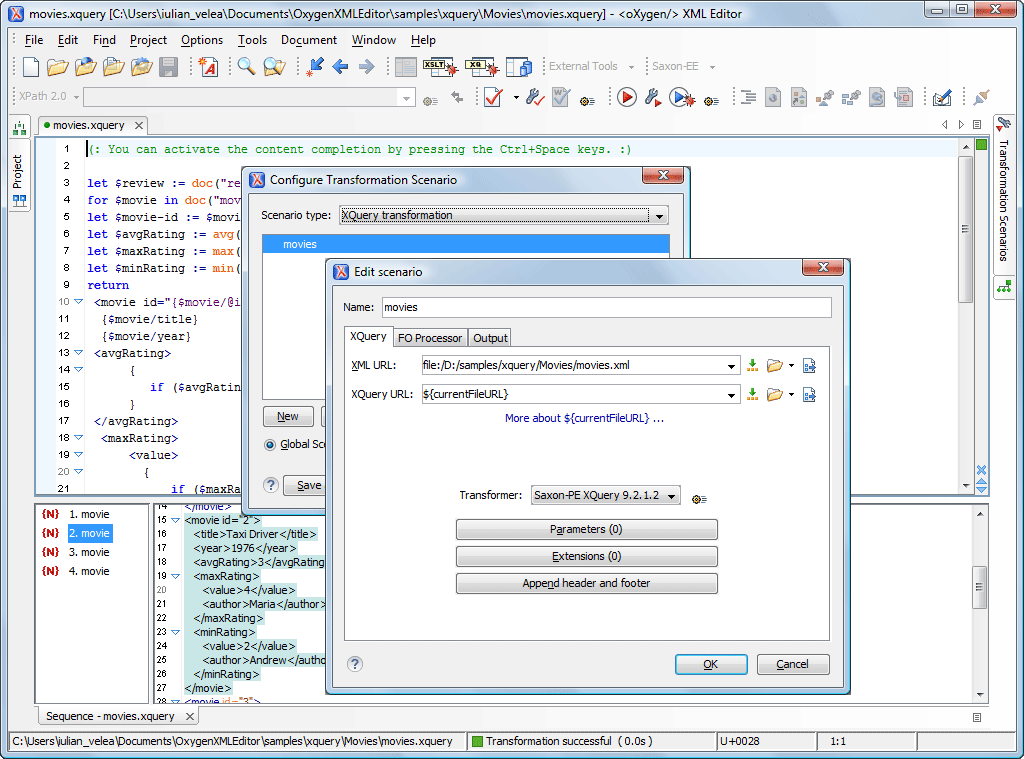
eXist supports XQuery interrogations over the stored XML content (for example you can create an XQuery to generate a report with the billing contact data from the latest purchase notifications). You can open an XQuery editor (New->XQuery), configure the transformation scenario to match the eXist connection for the transformer field, write the XQuery and then execute it.

eXist XQuery Support

XQuery Validation Support

You can configure eXist as main validator for XQuery files. For that you must go to Preferences->XML->XSLT/FO/XQuery->XQuery and set eXist for XQuery validation. Additionally you can set the other options. You will now benefit of the automatic validation feature and you can use Validate button to get a list of validation errors.

Alternatively you can use the Validation scenario support which is described here

WebDAV Support

Collection/resource management can also be done using WebDAV (see http://wiki.exist-db.org/space/WebDAV , oxygenXML section)

© 2002-2008 SyncRO Soft Ltd. All rights reserved. | Sitemap | Privacy Policy | This website was created & generated with <oXygen/>® XML Editor
News
Upcoming Events:

TOC Conference 2009
TOC Conference 2009
February 9-11, 2009
New York, USA

XML Prague 2009
XML Prague 2009
March 21-22, 2009
Prague, Czech Republic

Content Management Strategies/DITA North America 2009
CMS/DITA North America 2009
April 27-29, 2009
St. Petersburg, USA
Buy oXygen license
XML Editor
Enterprise $448  $366
Professional $366  $299
Academic $69  $48
XML Author
Enterprise $269  $220
Professional $199  $179
Special Offer
18% OFF from <oXygen/> XML Editor v10
This promotion is ending on January 15, 2009.
Video Demonstrations
Quotes
quote Intel is excited to have the <oXygen/>® XML Editor support the Intel® XML Software Suite. As XML developers are looking to deliver XML and SOA applications, the adoption of the Intel XML Software Suite will bring unparalleled performance right out of the box. As Intel continues to enhance the Intel XML Software Suite, the users of <oXygen/> will be able to extract new benefits seamlessly. This is a "win-win" for customers of both companies. quote
David Hinz
Intel Corporation