Visual - WYSIWYG DITA Editor
DITA Editing Support
<oXygen/> DITA Editor (available in all <oXygen/> distributions) allows
the users with less knowledge of XML to edit DITA documents in a similar way
to a regular text processing application.The DTDs and XSL stylesheets from
the DITA Open Toolkit are packed in the standard <oXygen/>
distribution.
<oXygen/> includes the latest version of the Dita Open Toolkit. This
contains the basic DTDs and XSL stylesheets. Based on these files,
<oXygen/> offers intelligent XML editing, validation, content
completion and a number of predefined transformation scenarios to PDF
and HTML. Please note that for a complete publishing solution based on
DITA, you (or a developer) should create a new set of DTD files
(specialization) and several ANT scripts.
With <oXygen/> XML Editor you can create:
- topics
- tasks
- concepts
- composites
- references
- maps
All the standard DITA elements are supported. If you are
using/creating a DITA specialization, you will find that <oXygen/> uses
the class attribute to identify one of the default
styles for your element. If you are not satisfied with the default
style, you can change the CSS files that are distributed in the
frameworks/dita/css_classed directory.
DITA Maps Manager
The DITA Maps are key components for authoring DITA
content. Managing these files and the referenced topics is an important
feature for a DITA aware editor.
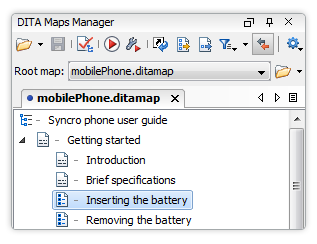
The new DITA Maps Manager allows viewing and
editing of DITA map files. It acts also similar with a project manager
allowing you to easily open different topics/concepts for editing. The
DITA maps manager is shown each time you open a
.ditamap file in <oXygen/> and it will appear as a
tab in the same stack as the Project view. A double click on a file
reference listed in a DITA map opens that file in the editor. The
toolbar, the contextual menu and drag and drop actions allow you to
easily edit the map content.
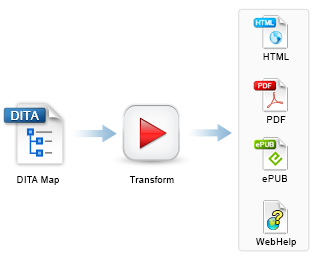
Closely integration of the DITA Open Toolkit for generating different
output formats
The tool chain for generating output in a multitude
of formats (XHTML, PDF, HTML, JavaHelp, Eclipse Help, DocBook, etc.) is
ready to use out of the box as <oXygen/> includes the latest version of
the DITA-OT.
Power users have also the possibility to fine tune
the transformations by using the advanced options like specifying
parameters for the ANT build files, filtering content using a DITAVAL
file, providing a custom build file, etc.
Integrated the Idiom FO plugin for DITA Open Toolkit
You can generate high quality PDF output using the
PDF2 transformation scenario. It uses the Idiom FO plugin that comes
already installed in the DITA Open Toolkit bundled in <oXygen/>. The
plugin transforms a DITA map to PDF using the XEP processor - if this is
configured in <oXygen/> XML Editor - or the built-in Apache FOP
processor.
Support for creation of conref links
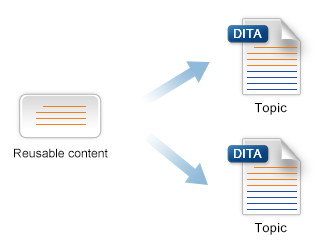
You can easily insert a conref in a DITA document
using the "Insert a DITA Content Reference" action. It allows you to
choose the target ID by selecting it from the list of IDs defined in a
topic.
Display of the resolved DITA content in the editor
The XML content referred with DITA conref is
presented in place as a read only block that can be collapsed/expanded.
In this way the XML editor shows a picture of the entire XML document
with all the XML references resolved.
In the above screenshot the referred XML element appears selected. If
you need to edit a referred element content, you can click the link that
is placed before it. <oXygen/> will open the file and place the caret
at the beginning of the referred element.
Specific DITA Actions
<oXygen/> is able to recognize the DITA documents based either on the
root element name or the DITAArchVersion attribute. When you switch to
the Author mode, the XML editor loads both the set of
CSS files and the available actions that were associated in the
<oXygen/> DITA configuration.
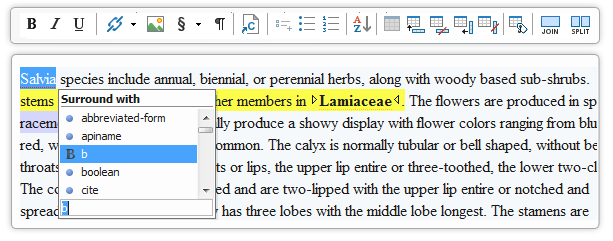
The action set includes operations for emphasising text, creating
lists, tables, sections and paragraphs.
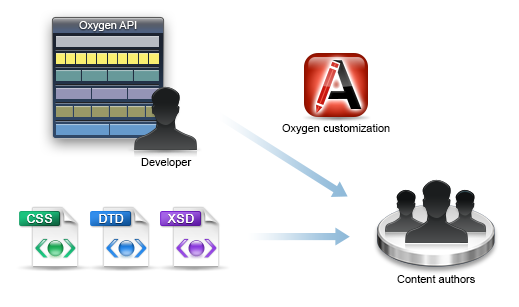
Extensible DITA Support
The CSS files, DTDs and even the actions from the toolbar and menus
can be changed. You can create new operations either customizing the
default ones - used for the insertion of XML fragments - or by creating
new Java Implementations. For more information, see the User Manual.
The next figure shows how the "Insert Paragraph" action has been added
to the menu.
CALS Table Support
You can easily create CALS tables, join or split cells, add or remove
rows. <oXygen/> will create all the column specifications for
you.
A CALS table example. The caret is positioned between two
cells.
DITA Documents Storage and Access
The access to document repositories can be made through WebDAV, FTP,
SFTP. More, <oXygen/> supports access to native XML databases (eXist,
Berkeley XML, MarkLogic, etc.. ) and relational databases (Oracle, IBM
DB2). If you are accessing a different content management system, the
editor can be extended by writing a Java URL protocol handler.
|